Round 20 · Easier to use, fair rankings, full Chinese — and a match scored end-to-end
Everything we've done since your last round, in one place. You told us the app felt complicated — so we added direct shortcuts for every role. Following up on Round 19, we corrected the ranking tie-break to match your Rules & Regulations v3.4 exactly (the order we showed you wasn't quite right). We translated the whole staff + captain experience into 繁體 / 简体 Chinese. And we played a full match through the app — line-ups, scores, both-captain sign-off, result, standings — to prove the scoring flow is solid. It also rolls up the new capabilities you and Richard signed off (typhoon stop-play, uphold-and-correct-score, club-manager access) and every report you filed with your voice notes and screenshots.
Everything below is live now and was checked on real data — not just "the page loads", but the actual numbers, the actual Chinese text, and a real completed match. Sign in and try any of it.
Easier for beginnersQuick-action shortcuts + Help on every role's home
Rankings = your rulebookHKPL Rules v3.4 — edit the rule, rankings follow
Scoring provenA real match played end-to-end through the app
1 · Easier for beginners — shortcut buttons everywhere, Help on every page
You said the app felt complicated. Our answer wasn't a rebuild — it was to put the right buttons in front of every role, add one-tap Help on every page, and give first-timers a chatbot that answers "how do I…" in plain language. Nothing you rely on changed; everything was added on top.
Quick-action buttons — tailored to every role
Everyone used to land on a page with no obvious next step. Now each role's home opens with a row of the things they do most — not a generic menu:
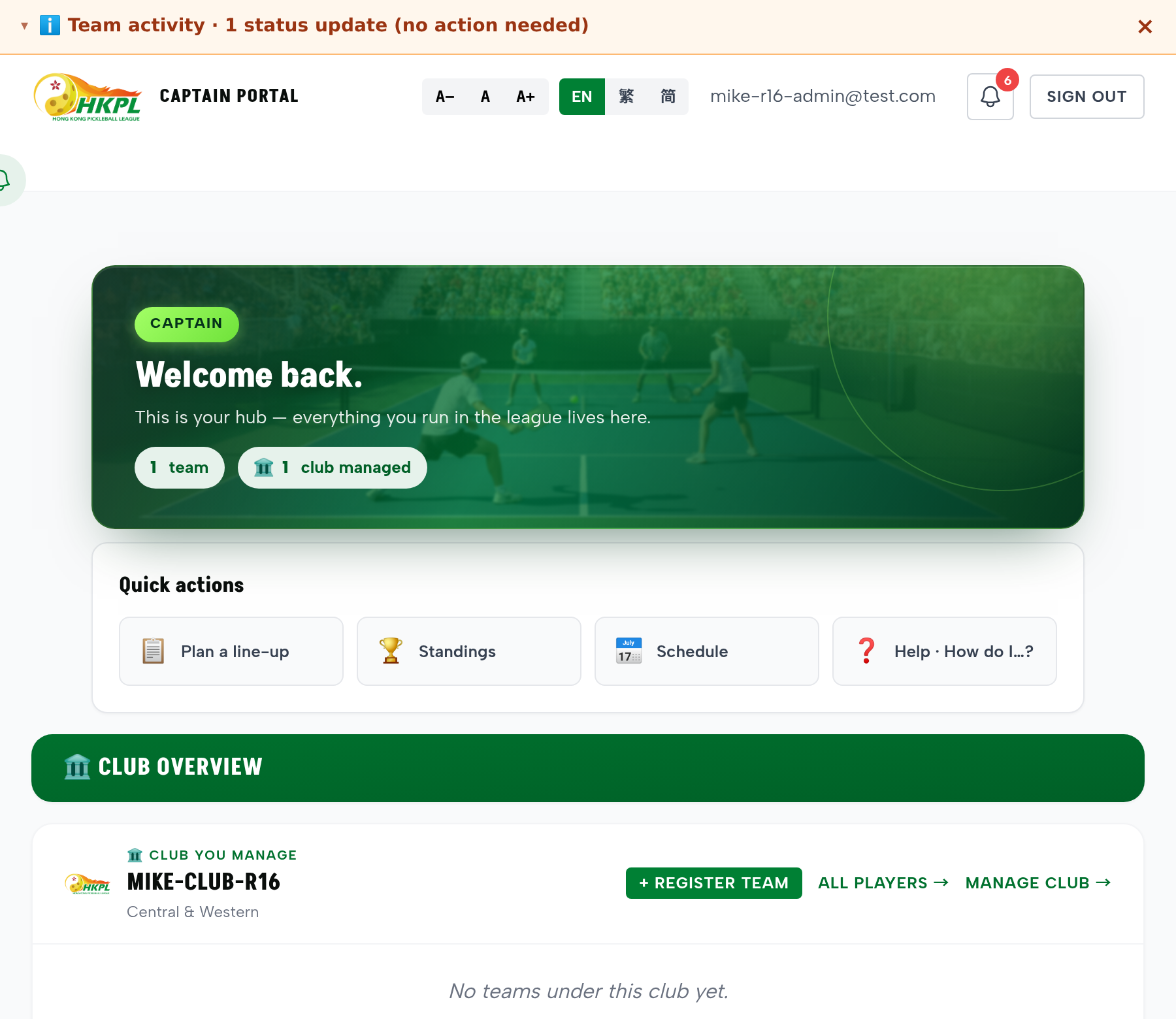
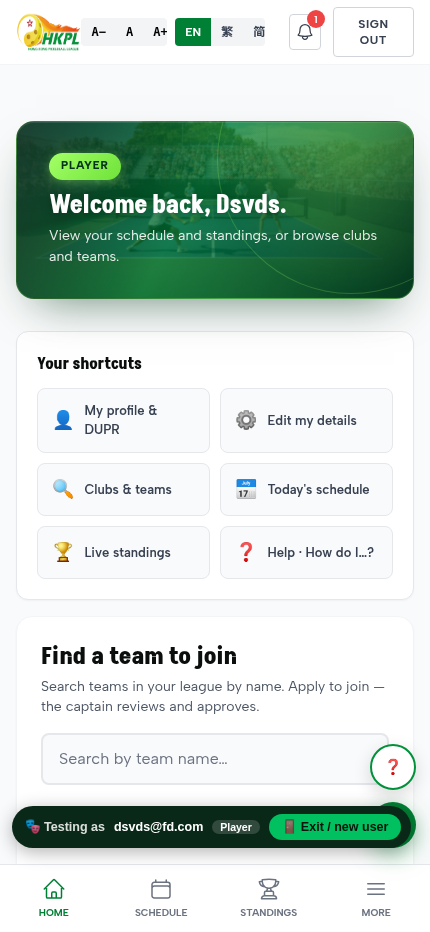
Captain: Plan a line-up · Standings · Schedule · Help | Player: My profile & DUPR · Edit details · Clubs & teams · Today's schedule | Finance: Registration receipts · Unpaid teams | Spectator: Watch live · Schedule · Rankings
How to test: sign in as any role — the shortcuts appear right under your welcome. One tap each, any time.
Help on every page — as one widget
Rather than adding Help page-by-page, we made it a single widget that appears on every page automatically — so a beginner always has one-tap guidance, wherever they are, and it can never be "missing" on a page again.
How to test: look for the floating ❓ Help button (bottom-right) on any page.
An AI assistant that answers "How do I…?"
A first-timer can just ask, in Cantonese or English (by voice or text) — and get a plain-language answer that quotes your rulebook. Example, live: "How do I submit a score?" →
"Score submission is handled by the Home team captain… submit a photo of the signed score sheet and input the scores digitally within 3 days after the match [§4.0]… [sign in] to submit."
One consistent navigation, cleaner menu
The top navigation is now a single shared header used across the site (so it looks and behaves the same everywhere), and it's shorter — we dropped the redundant Home link (the logo already goes home) and duplicate All Players / All Clubs, and moved Rules under Help.
Shortcuts you may have missed — surfaced
A + Register team button now sits on your managed-club card, and a top strip shows "what needs your attention" — no digging.
A cleaner, on-brand look
The "This Week" results box and the shareable match-result card were black/off-brand — both are now the site's crisp white with a green accent and a lime WINNER badge.
Captain home — Quick actions (Plan a line-up · Standings · Schedule · Help) right under the welcome, plus the floating ❓ Help button.Player home — a different set of shortcuts (Profile & DUPR · Edit details · Clubs & teams · Today's schedule · Live standings · Help), tailored to what a player needs.
2 · New capabilities you (and Richard) asked for built & live
🌧 Typhoon / bad-weather stop-play switch
On top of the automatic HKO T8 / Black-Rain postponement, admins can now manually stop play for a day — every scheduled match that day is postponed in one click, and a matching Resume day button puts them back.
Where: Admin → Matches → the amber 🌧 Weather stop-play card (date pre-filled to today).
Uphold a dispute and fix the score in one step
When the committee upholds a dispute, you can now enter the corrected score in the same action — the app recomputes the winner and updates the standings automatically, no separate edit.
Where: ⚖️ Disputes → ✓ Uphold → it offers to enter the corrected home/away games.
Club managers can now run every team in their club
A club manager kept access to all their club's teams even after a captain handover — full captain-level control across the club. (For fairness, a manager still can't sign both sides of a match — two-party confirmation is preserved.)
Build any match-up preview
The match-up page now shows each team's full roster as tappable chips — pick any 1v1 or 2v2 and the win-probability updates live.
Where: Match-up page — tap players on each side to compose the pairing.
Roster-lock date — now in plain English
The "player registration deadline" field was hard to find because of the jargon. It's now labelled "Roster lock date (roster changes close)" with a hint that existing players keep playing.
The Help / feedback button is now on every page
The bug-report / feedback widget used to be missing on ~48 pages. It's now added automatically site-wide, so members can report an issue from anywhere.
3 · The ranking tie-break — corrected to your rulebook follow-up to Round 19
In Round 19 we started showing the ⚖ tie-break reason on each row. Since then we checked it line-by-line against your Rules & Regulations v3.4 — and found the order wasn't exactly right. This is the correction.
The tie-break order now matches Rules v3.4 exactly
The correct order is: 2 teams tied → head-to-head · 3+ teams tied → most games won · then net points · then a re-match.
What was wrong: the earlier logic added an extra "head-to-head games difference" step and applied head-to-head even to 3-or-more-team ties — your rulebook does neither. Both are removed. On live data this corrected the order in 6 divisions, including division leaders — so a few standings will look different, and now correct.
Edit the rule once → the whole app follows
The tie-break is now a single rule the app reads, not logic scattered across the code. If your rules ever change, you edit that one rule and the ranking, the "ranked by…" line, and every ⚖ reason all update together.
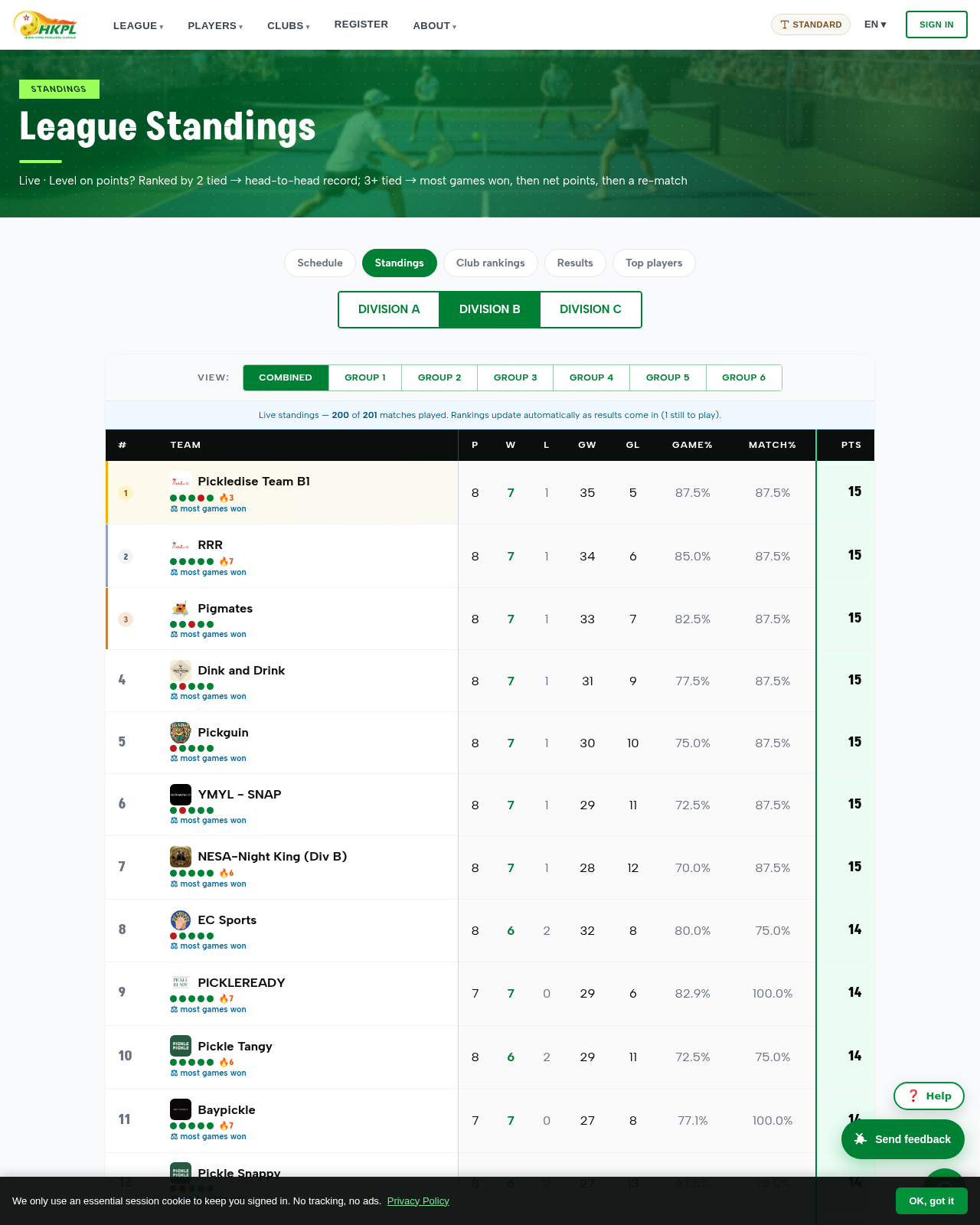
Division B, live data — after the correction. Teams level on 15 points are now ranked by most games won (the rulebook's rule for 3+ tied teams), each row showing its ⚖ reason.
4 · Chinese — now on the staff & captain working pages too 繁 + 简 verified
Round 19 made the standings read correctly in Chinese. Since then we've finished the job on the pages your captains and committee actually work in — these were still English-only.
Captain line-up planner — fully translated
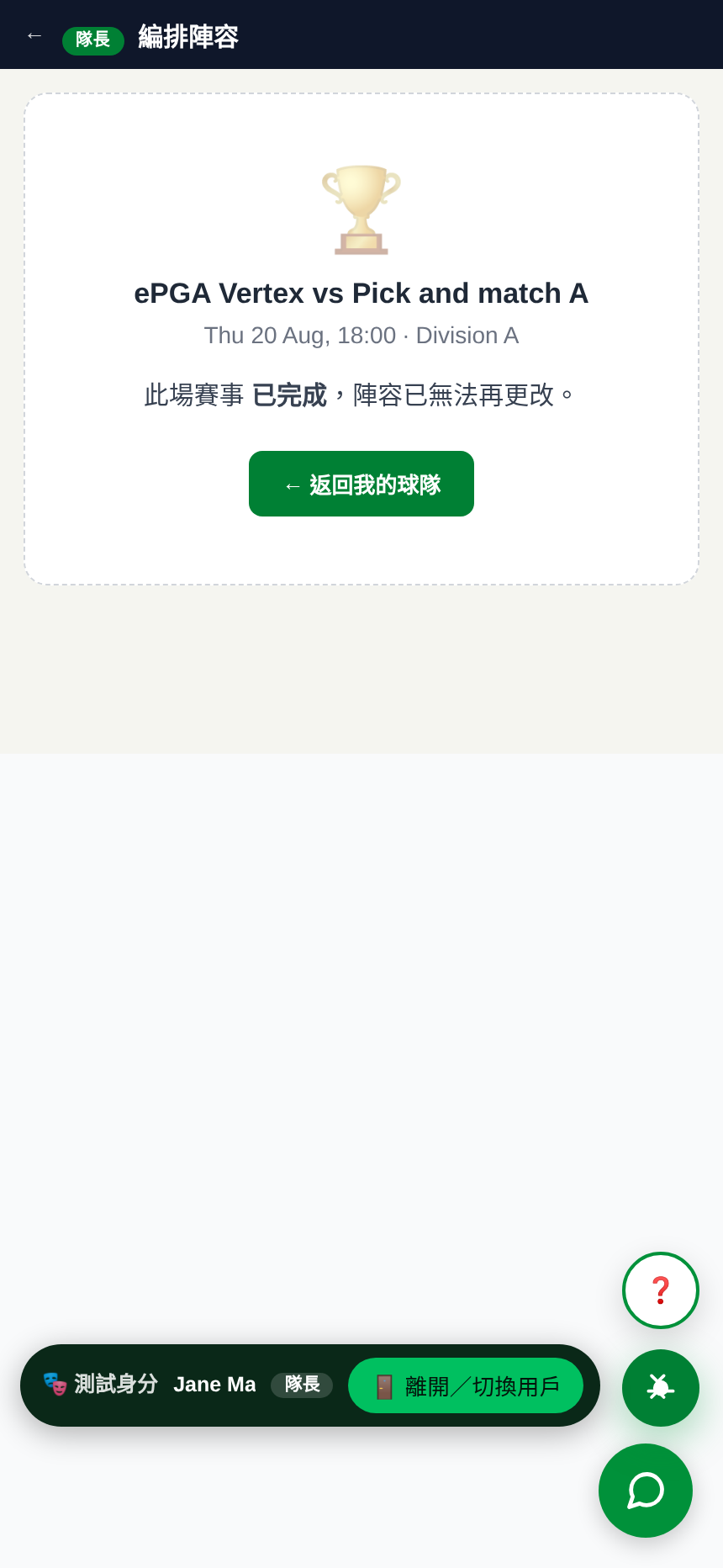
Every word on Plan line-up now follows the language switch — match card, roster, the "reveal line-up" flow, borrowing a player, game names (女子/男子/混合雙打), and every prompt.
How to test: switch to 繁 or 简, open Plan line-up — the title reads 編排陣容, and nothing stays in English.
Approvals, Disputes & Office Inbox — translated for staff
The three staff work-surfaces were English-only. They now localise end-to-end: titles, filters, every dispute row, all action buttons, the re-match form, and every confirmation.
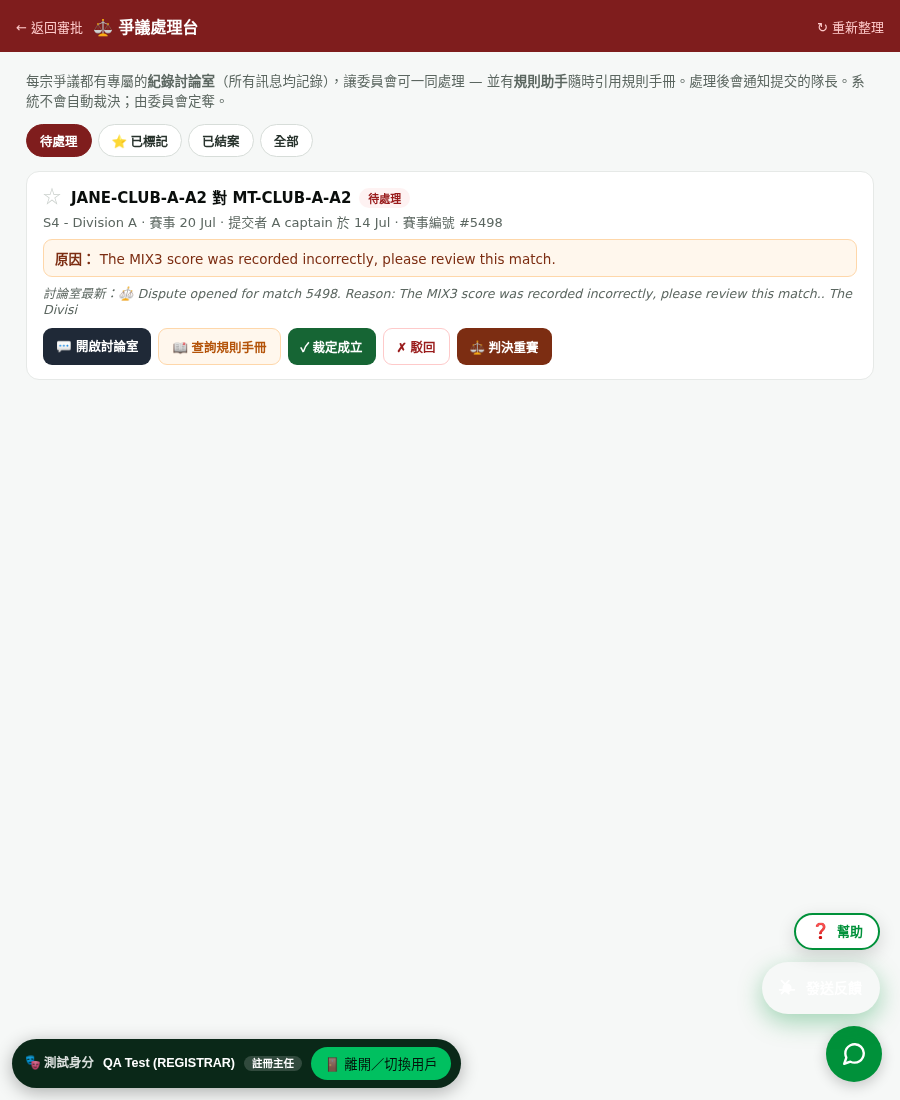
How to test: as Registrar/Committee, switch language, open ⚖️ Disputes — title 爭議處理台, tabs 待處理 · 已標記 · 已結案 · 全部, real disputes shown in Chinese.
爭議處理台(繁體). A real dispute — teams, status 待處理, and every button (開啟討論室 · 查詢規則手冊 · 裁定成立 · 駁回 · 判決重賽) translated.編排陣容(繁體). The captain line-up planner in Chinese — game names, roster, and controls all follow the language switch.
5 · We scored a real match through the app — start to finish completed match verified
The full flow works — and we proved it on a real match
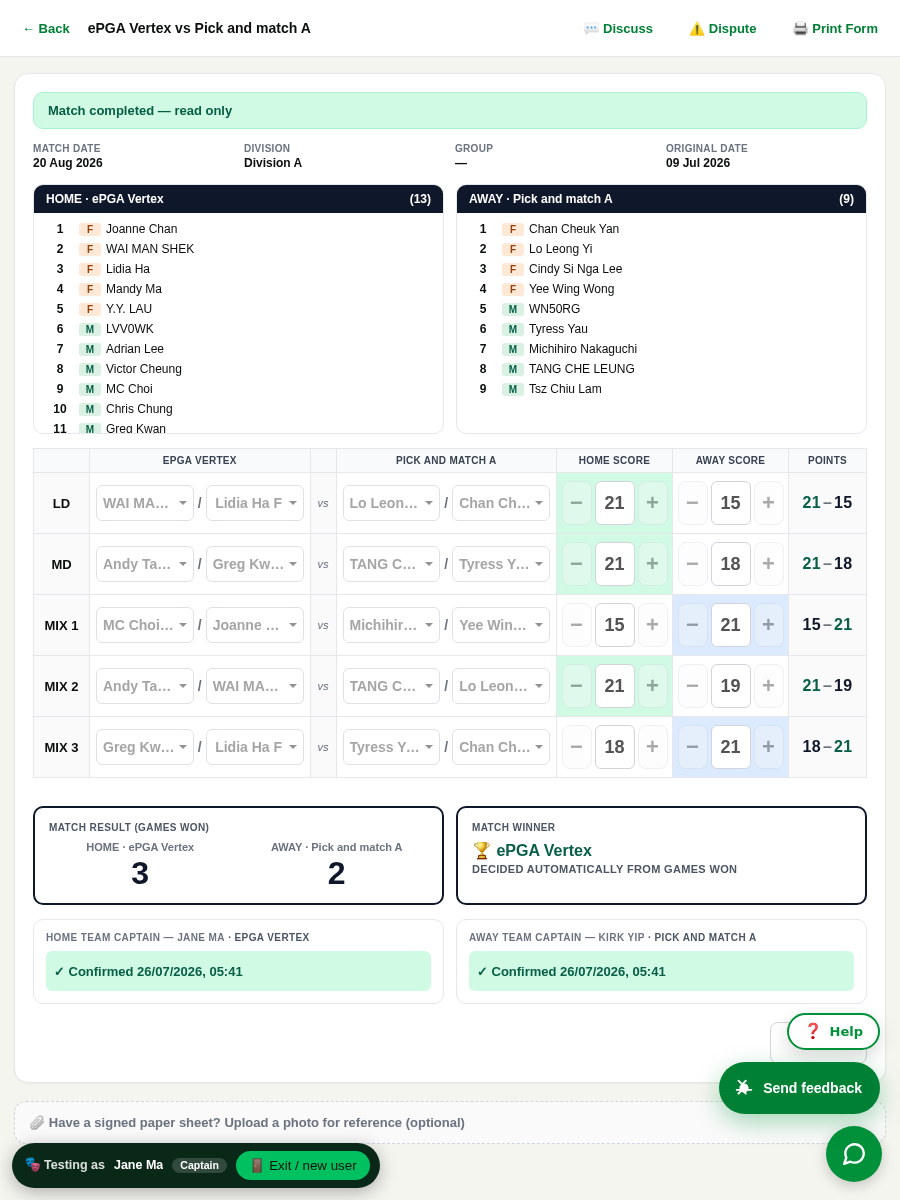
We drove a complete match through the live app: both captains set their line-ups, entered the five game scores, and gave their co-signatures. The app validated the scores, decided the winner, and updated the standings — with no manual steps.
Result: ePGA Vertex vs Pick and match A → games 3–2 → winner decided automatically → both captains confirmed → the completed match now counts in the Division A table.
Scores are checked against the rulebook as you type
Each game is to 21. A legal final is exactly 21 to 0–20 (so 21:20 is valid — sudden death, no win-by-two). Anything else turns the cell red before you can submit.
Checked live: 21:15 ✓ · 21:20 ✓ · 22:20 rejected · 3:2 rejected · 11:9 rejected — and the app won't accept a game until both pairs are named.
A real completed match. Five games (21-15, 21-18, 15-21, 21-19, 18-21), result 3–2, winner 🏆 ePGA Vertex decided automatically, and both captains confirmed — exactly the flow your captains will use.
6 · Your reports — fixed from your voice notes & screenshots
Scoresheet — score digits no longer reverse
Typing "21" came out "12", "15/17" as "51/71". Fixed — scores now read exactly as typed.
Scoresheet — no more auto-filled players before you plan
The sheet used to pre-fill players from your last match and lock them. It now starts empty until you set the line-up.
Played matches — no stray Reschedule / Plan buttons
Once a match is finished, the Reschedule and Plan-line-up buttons are hidden — no confusing dead actions.
Captain can open every player's info
Roster rows are now all tappable — with or without a DUPR id — opening the player's profile.
Registrar can see who is applying
Name-less applicants now show their email + a "no name on file" flag instead of a wall of "Unnamed applicant".
Approving a player closes their other requests
Approving a player onto a team now auto-cancels their other pending requests in the same division — no more misleading "waiting".
Admin — Sign out is now easy to reach
Added a visible Sign out to the sticky admin header (it was buried at the bottom of the sidebar).
Admin — tables sort, menu tidied, rule codes readable
Users & club-player tables sort by any column; the side-menu's duplicate "System" header is merged; raw rule codes now show plain-English labels.
"Edit my details" is now on the player home
The settings page (name / phone / DUPR / language / photo) was hard to find — now a one-tap shortcut on the player home.
Missing footers & bottom-nav restored
Five pages (Register, Club leaderboard, Players, Stats, Match-up) were missing the footer / bottom navigation — now present everywhere.
Profile no longer shows your name twice
The player profile printed the name in both the banner and the card — de-duplicated to a single clean header.
Branding preview + photo covers fixed
The admin live-branding preview now reflects the chosen colours; photo albums without a cover now show a proper image instead of a flat grey.
"Matches played" now says what it means
A player's profile counted matches but labelled it "Games played" — it now reads "Matches played", matching the standings table.
Cleaner ⚖ ranking notes + no dead "Back to Admin"
The tie-break ⚖ note only shows where it's accurate (below a same-points team); and the "Back to Admin" button no longer appears to staff who can't open the admin page.
7 · Under the hood — safety & reliability
Access control — audited, no leaks tested
We checked every staff page and sensitive data feed as a low-privilege user (player / spectator): all correctly blocked, including write actions. A member on the wrong tenant cannot see another league's data. Zero leaks.
Every role walked through, on a phone
We signed in as each role on a mobile screen and clicked through their shortcuts to the real destinations — Captain, Player, Registrar, Referee, Finance, Spectator, Admin — every link lands on a working page, with a ❓ Help button on each.
Everything in this report is live, and every item was behaviour-tested — not just deployed.
We didn't only check "the code is there"; we drove each feature to its result on real data: rankings recomputed on the live database, the Chinese text rendered on real pages, a full match played through (line-ups → scores → both signatures → 3–2 result → standings), the weather stop-play/resume cycle run and reversed, a dispute upheld with a corrected score, and every staff page blocked for the wrong role.
Sign in and test anything yourself; if a ranking looks off, the ⚖ line on Standings names the exact rule that decided it. HKPL · Round 20 · July 2026