HKPL — Round 15 · A full re-check of every past report · 13 July, updated 14 July 2026
This round we went back through every report we'd ever received and re-checked each one properly, on the live site. A handful had been marked "fixed" too early — so we genuinely fixed them this time, with proof (screenshots below). We also made the site noticeably faster, and tightened our own testing so a fix can't be marked done until it's been verified working.
Everything below is live on UAT to try now. Open
the role picker, sign in as any role, and use the "try it" links. Toggle
EN / 繁 / 简 top-right on any page.
310Reports re-verified
60+Fixed with proof
680→1Human inbox — essentially cleared
63+Fixed & verified
Fixed this round — with proof
Help & FAQ page — the banner is backFixed
Tester: “can we have the same background photo in the top banner for page consistency”.
What we didThe Help page was the one public page missing the green header banner every other page has. Restored — it now matches the rest of the site.
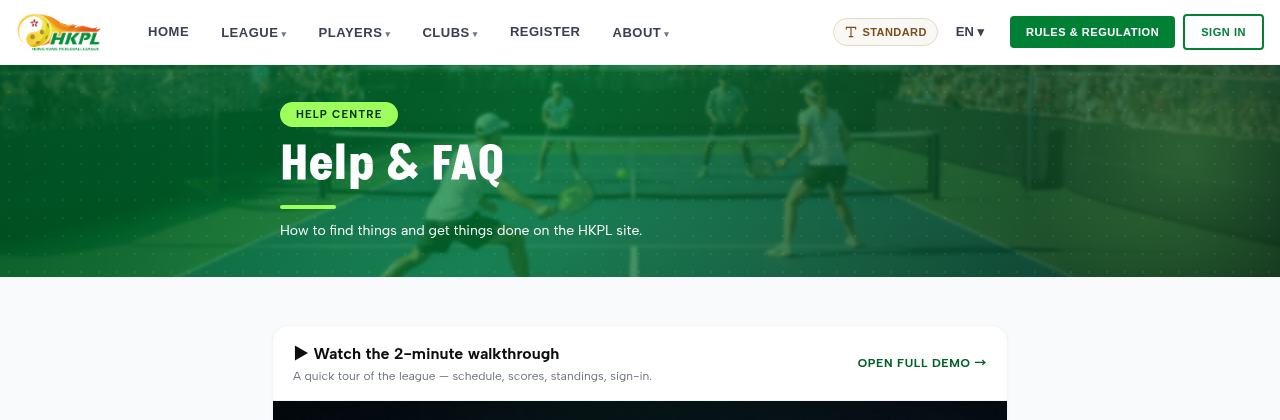 Live: the Help & FAQ page now carries the standard banner.
“Submit Score” — clearer wording + iconFixed
Tester: “change the wording of photo + AI … just say ‘Enter your scores’”.
What we didThe tile now reads “Enter your scores” with a pencil/edit icon (was “Photo + AI extraction” with a camera). Translated to 繁 / 简 too.
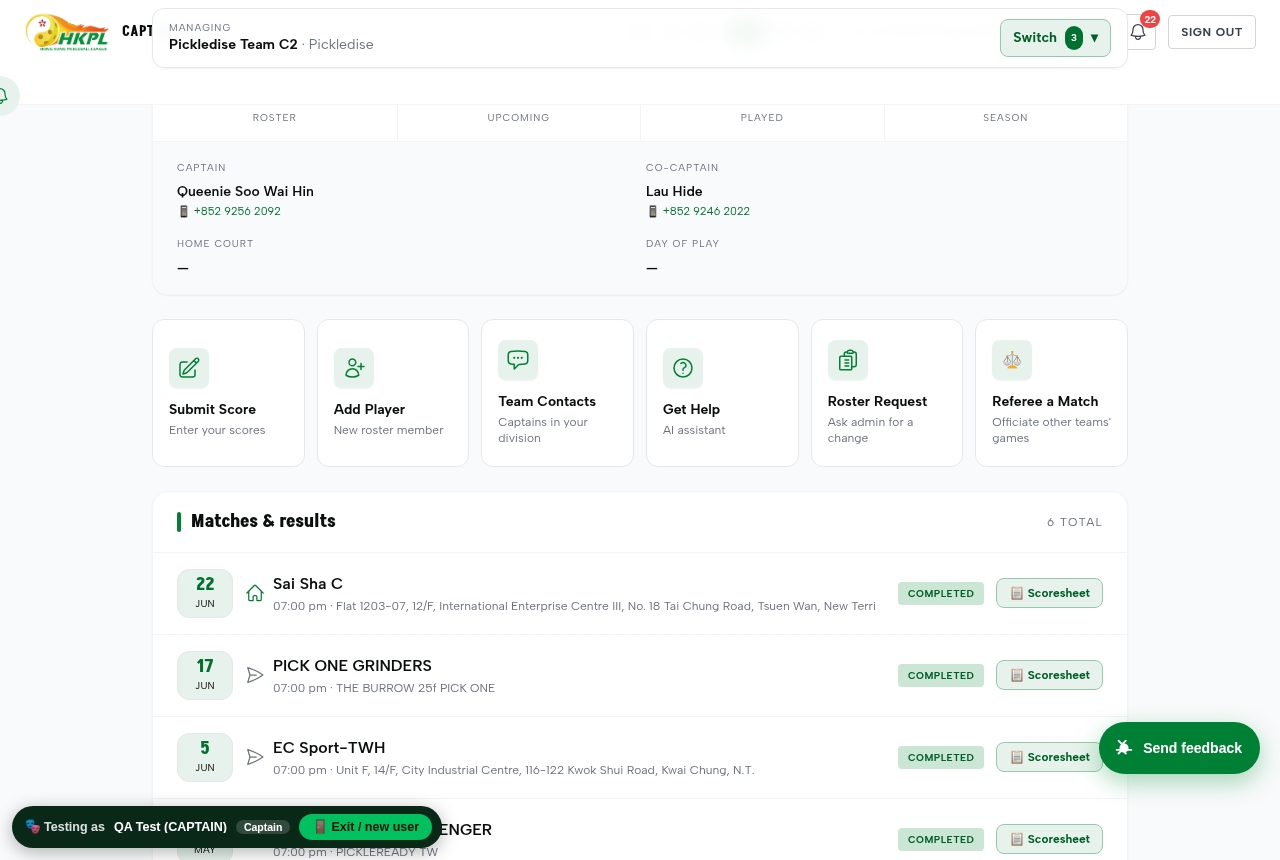 Live: captain home — the Submit Score tile.
Club Managers table — click any column to sortFixed
Tester asked for the Club Managers table (Admin) to be sortable by clicking the column name.
What we didClick Club, Primary Manager, or Co-Managers to sort; click again to reverse. An arrow shows the active column.
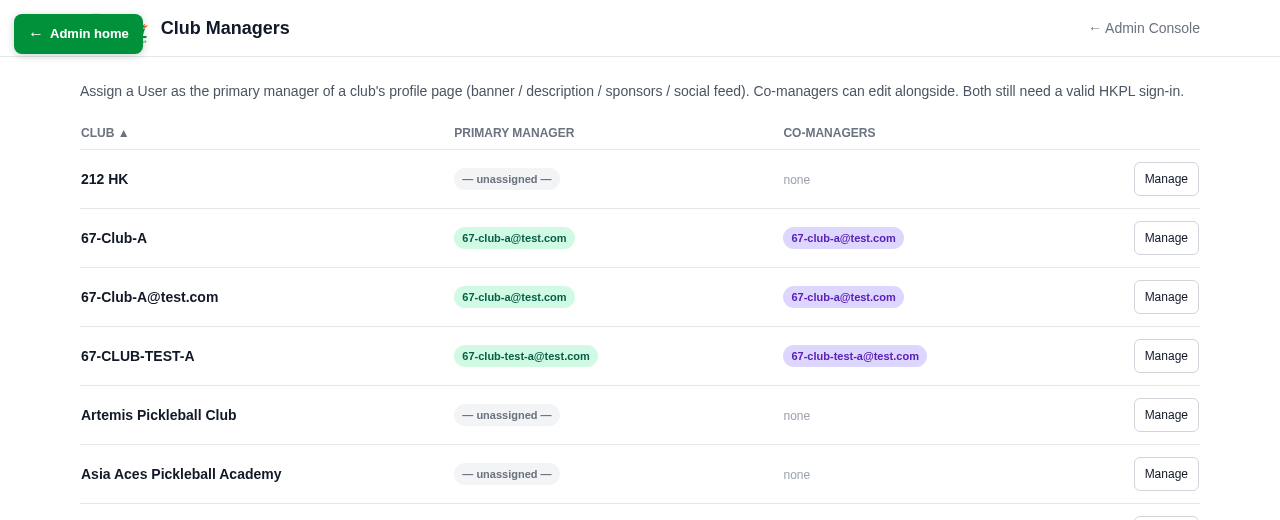
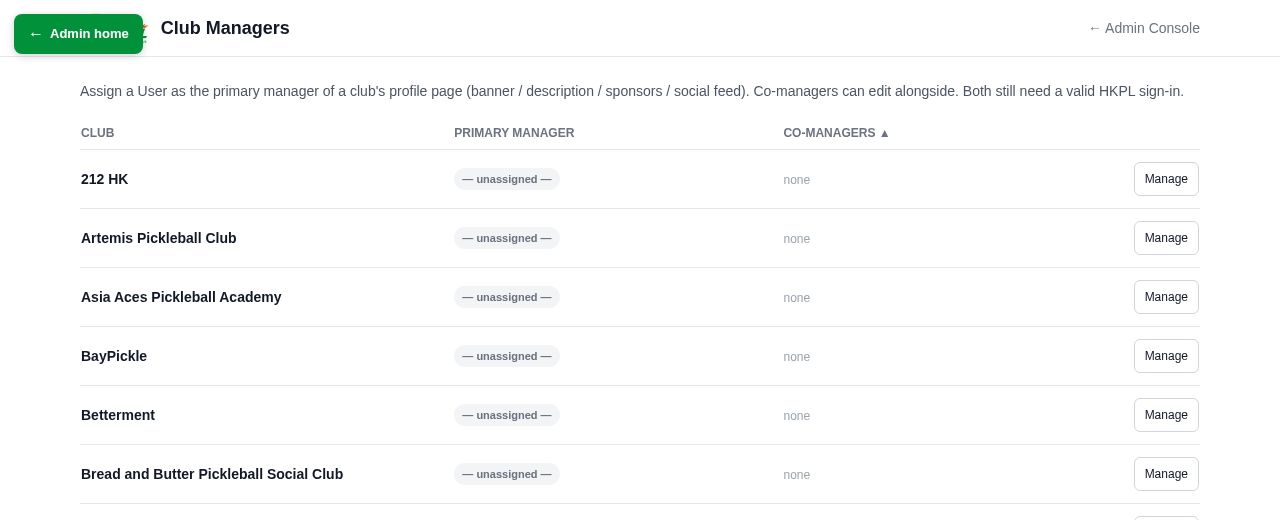 Before (sorted by Club ▲) → after clicking “Co-Managers” (rows re-order, arrow moves).
Try it → Club Managers (admin)
System Health now watches the SMS gatewayFixed
Tester wanted the admin health page to show the SMS gateway status (alongside email, database, etc.).
What we didThe Super-Admin System Health page now lists SMS with a live status. It reads “not configured” until the SMS account is set up (see the one item that needs the committee, below).
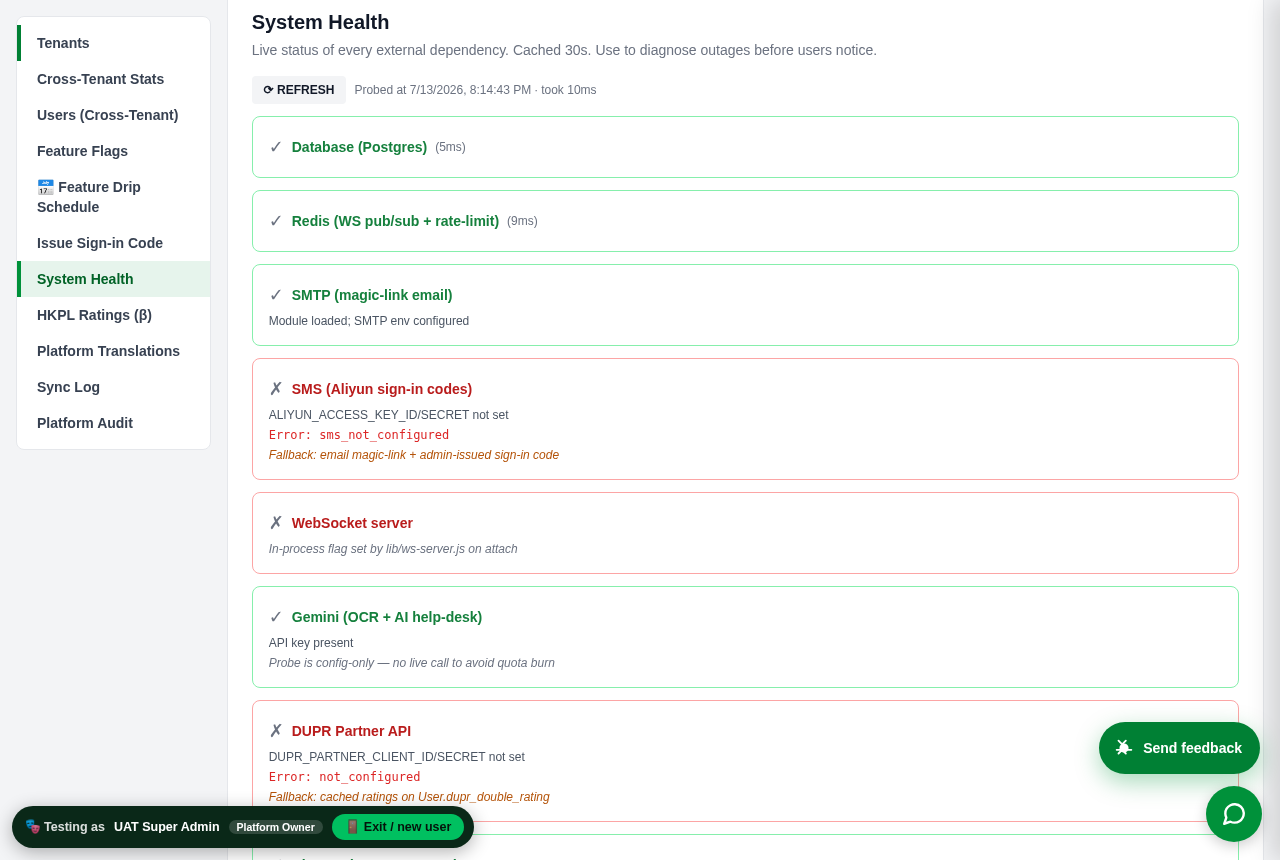 Live: System Health — SMS now appears under SMTP.
Sample disputes are always available to testFixed
Tester: the sample disputes disappeared between tests — “make the disputes samples there all the time”.
What we didThe dispute queue now re-seeds a sample dispute on every nightly refresh, so the Division-Rep dispute panel is never empty when you test it.
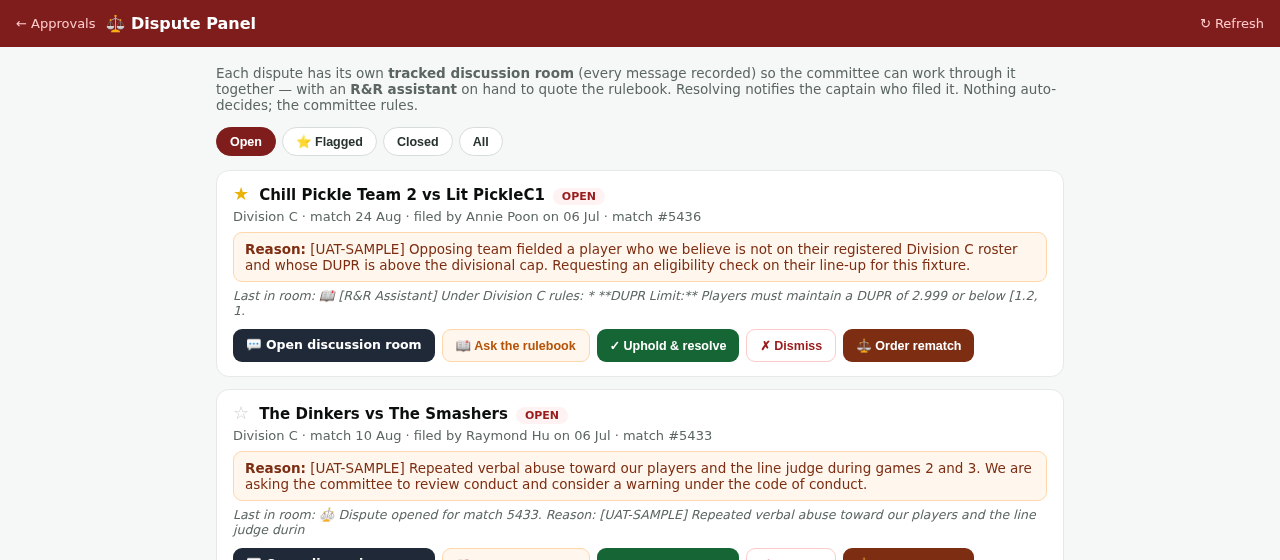 Live: the Dispute Panel “Open” tab, always populated.
Captain roster now shows match-day attendanceFixed
Tester wanted, per player: DUPR, games played, and attendance.
What we didEach player on the captain's roster now shows match-day attendance — how many distinct matches they actually turned up and played in — next to their games and win/loss. (It's different from "games": a player can play several games within one match, so attendance is the truer "how often do they show up".)
Try it → sign in as Captain, open your roster
Spectator role added to the test role-pickerFixed
Tester: please add a Spectator role to the sandbox role-picker.
What we didThe role picker now includes Spectator — sign in as a signed-in fan (browses schedule, results, standings, player profiles; no team actions) to test that view.
Try it → the role picker
Precise club address (Unit / Building / Street)Fixed
Tester wanted precise address input for a club — Unit / Building / Street, not just District.
What we didThe admin “Add a club” form now captures Unit / Floor, Building name, and Street alongside District & Region, and stores them on the club record (for the club page + map marker).
Admin: “browse by club” to stand in anyone’s shoesFixed
Tester: the admin sign-in-as tool should let you browse by club, like the role picker does.
What we didThe admin impersonation panel now has a club dropdown — pick a club to instantly list just that club’s people, then “Stand in shoes”. (Verified: picking a club narrowed 360 people down to that club’s 11.)
The AI Get-Help assistant replies fasterSpeed
What we didThe in-app assistant used to take over a minute to answer. It now replies in about 3 seconds — we found it was routing through a slow connection and switched it to the fast one. Same improvement benefits every AI feature (scoresheet photo scan, etc.).
Line-ups now stay secret until both captains revealFixed
Tester: on the Plan Lineup page, the opposing captain could see my planned line-up before the match — that shouldn't be visible early.
What we didOn the Plan Lineup page, your line-up is now private. Each captain has a "🔓 Reveal my line-up" button — the opposing line-up appears only once both captains have pressed it. You control the timing (press it right before the match). Simple, mutual, no waiting on the system.
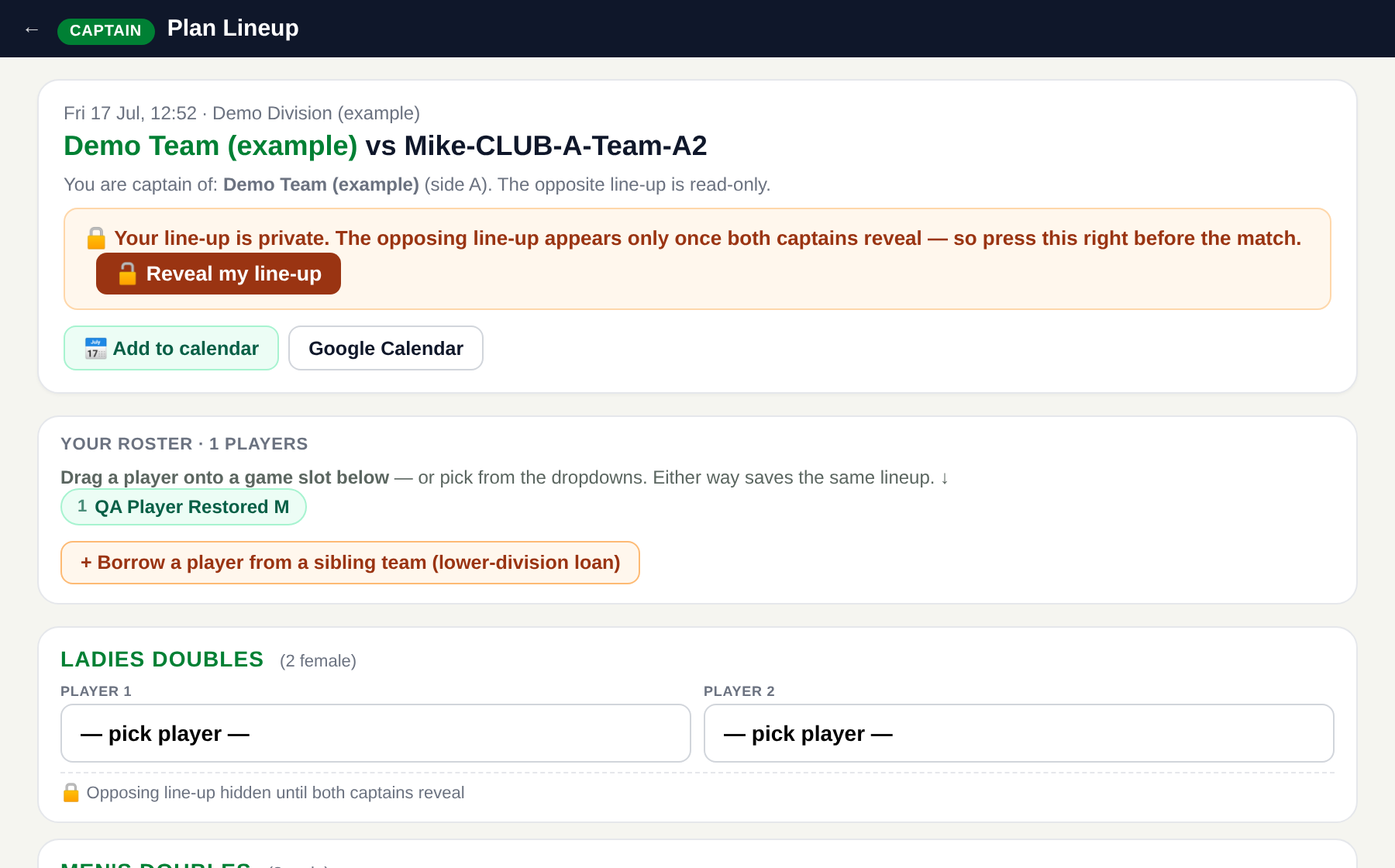 Live: your line-up private, one-tap reveal, opponent hidden until both reveal.
Footer wording matches the menuFixed
What we didThe page footer said “Ranking” for a link the top menu calls “Standings”. Now consistent — both say Standings.
The whole site is faster to loadSpeed
What we didThe site used to build its styling in your browser on every visit. It now loads a pre-built, compressed stylesheet — a small fraction of the size — so pages appear faster, especially on mobile and on slower connections. Nothing looks different; it just loads quicker.
Session 2 (13 July) — full backlog re-check, robot clean-up & a 繁/简 pass
Scoresheet — clearer confirming (who + when + auto winner)Fixed
Testers: “change ‘sign’ to ‘confirm’… list the home captain’s name so people know who’s confirming… date is not enough, need a timestamp… don’t let captains pick the winner, the system should decide”.
What we didThe button now reads “Confirm Scores as Home Captain” and shows who the captain is (name · team) plus the exact date & time of each confirmation. The Match Winner is now decided automatically from games won — the pick-a-winner buttons are gone, so nobody can select the wrong side.
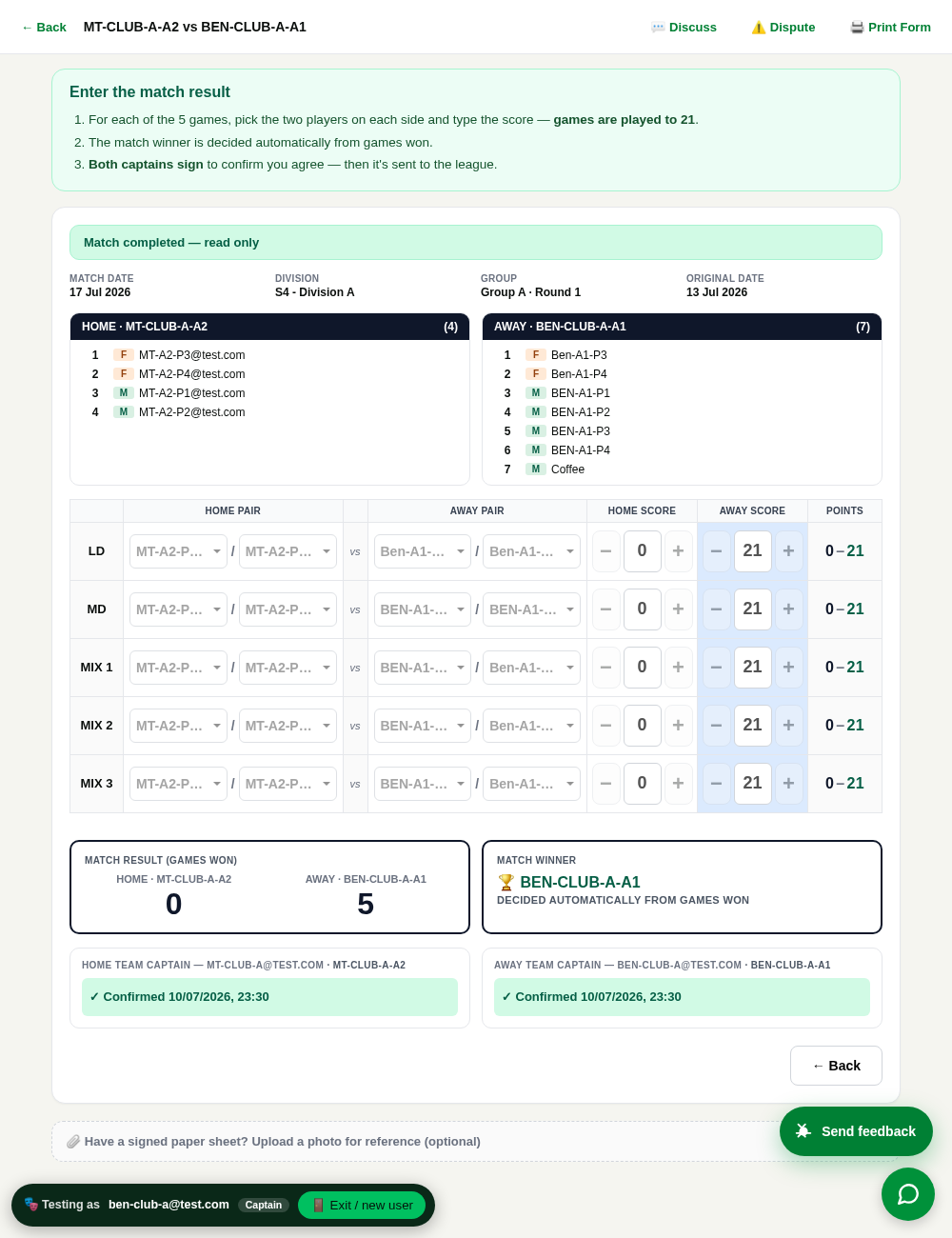 Live: auto winner, “Confirm Scores as…”, captain name + timestamp.
Scoresheet — tidier & saferFixed
Testers: “remove the Plan Lineup button on a finished/cancelled game… highlight a wrong score like 22:0 in red, don’t turn it purple… all scores should go through the scoresheet”.
What we didThe Plan Lineup button disappears once a match is confirmed or cancelled. An impossible score (e.g. 22:0) is flagged red, while the “team won” tint is now a calm blue (was a purple that looked like an error) — and valid deuce scores like 22:20 stay normal. The two quick-submit shortcuts are removed so scores only go through the confirmed scoresheet.
Plan Lineup — no double-picking a playerFixed
Tester: “when I pick a player in one slot, the other slot should remove them… and bring them back if I deselect”.
What we didWithin a game, a player you pick in one slot now drops out of the other slot, and reappears the moment you deselect — no more accidental duplicate.
Club Manager — a proper Club OverviewFixed
Testers: “a club manager should land on a CLUB OVERVIEW — the clubs they manage, teams grouped by division — not the captain portal”.
What we didClub managers now get a 🏛️ Club Overview — each club they manage, with its teams grouped by division, a Manage club link for branding, and each team linking to its own page. It handles multiple clubs. (One open question below: whether they should land here by default.)
 Live: Club Overview — teams grouped by division.
Match ID in the upcoming-matches listFixed
Tester: “can you display the match id in the upcoming matches table?”
What we didEach match row now shows its #ID (e.g. #5505) next to the time and court.
Public pages — polishFixed
Several small asks across the public site.
What we didPremium clubs are pinned to the top of the Clubs page (with an admin ★ toggle to choose them). Sponsor logos now link to the sponsor page. The editorial email is removed from Contact. An internal admin note that was leaking on the Organization page is gone. Top Ten & Club Rankings got the “View:” label to match Standings.
Admin — data completeness & toolsFixed
Testers: “only 500 players show, should be 1600+… Club Managers tab is missing our new clubs… add a club search… can the registrations table sort by column?”
What we didThe admin player list now shows all 1,735 players (was capped at 500). The Club Managers tab now shows the correct league’s clubs (it was showing the wrong tenant for a super-admin) and has a search box. The Registrations table is now sortable by any column.
Mobile — compact footer & a cleaner menuFixed
Vincent: “the mobile footer wastes vertical space — use more columns / horizontal space… the hamburger menu is not professional”.
What we didOn phones the footer is now a balanced 2-column layout (was a tall single stack). The menu got rounded tap-pills, bigger touch targets and an active-page highlight — much more app-like.
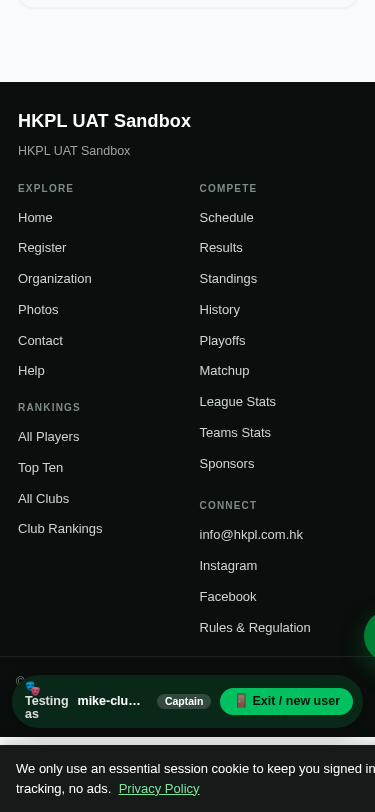
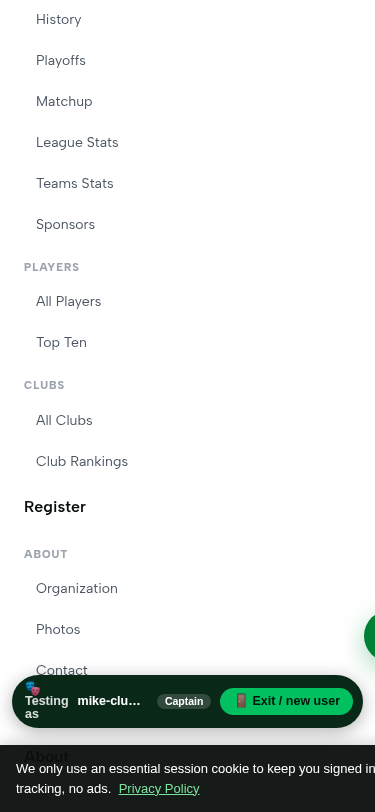 Live: balanced footer + polished menu (phone).
Your feedback inbox — cleaned upFixed
The inbox looked overwhelming with hundreds of open items.
What we didAn automated QA robot had been filing ~35 cosmetic notes a day into the same inbox as your real reports — 625 of them, none ever actioned. We switched that robot off and moved its notes to a separate bucket. Your inbox now shows ~55 real human reports instead of 680.
繁體 / 简体 — everything above is translatedFixed
What we didEvery new label from this session (Confirm Scores, Club Overview, the winner note, captain lines, the “View:” label, and more) is translated to Traditional and Simplified Chinese and verified on the live site in all three languages.
Scoresheet team names + spectator bannerFixed
Testers: “replace ‘Home Pair’ / ‘Away Pair’ with the team names”… “the spectator page top banner is white — it should be green with the background image like every other page”.
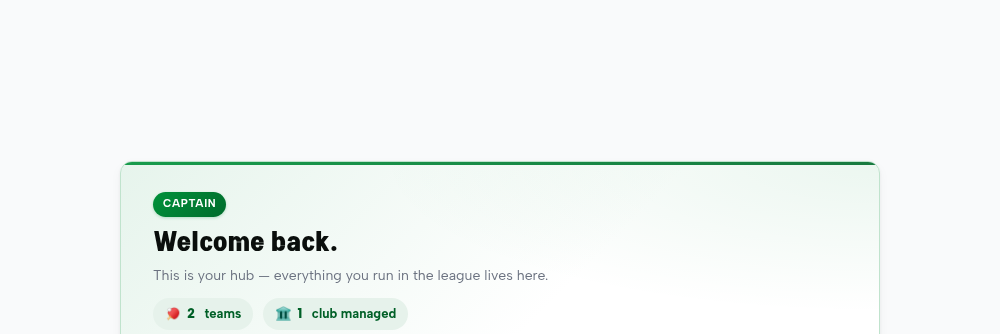
What we didThe scoresheet columns now show the actual team names instead of “Home Pair / Away Pair”. And every role’s welcome banner (spectator, player, finance…) now uses the standard green banner image with white text, consistent with the rest of the site.
 Live: the welcome banner — now the green house style.
Matchup players + Lock Lineup flowFixed
Testers: “on the Matchup page a team’s players are stuck in ‘Syncing…’ even though the team has players”… “rename ‘Save Line Up’ to ‘Lock Line Up’, then ask ‘Play game now?’”.
What we didOn the Matchup page, players no longer hang on “Syncing…” — a numeric DUPR id was being looked up the wrong way; now they resolve and display. And on Plan Lineup, the button reads “Lock Lineup” and, once locked, offers to jump straight to the digital scoresheet to start the game. (Both translated 繁/简.)
Returned players + “Log in as user”Fixed
Testers: “a borrowed player I returned keeps showing as Pending, and returning again errors ‘no such player’”… “the function to log in as which user is missing”.
What we didA returned borrowed player now disappears from the roster properly (it was reappearing as “Pending” because returned rows weren’t filtered out). And the “Stand in a real user’s shoes” impersonation tool wasn’t gone — it lives on the Admin Dashboard for Platform Admins; we added a clear pointer on the User-Overrides tab so it’s easy to find.
Session 3 (13 July) — dispute, reopen, scoring & a new editable Indemnity page
“Reopen” was cancelling matches (captains stayed locked)Fixed
Testers: “both captains confirmed, we reopened the scoresheet from admin, but the captains’ screens stay locked — the reopen button does not work.” + “a reopened match says ‘cancel’, should say ‘reopen’.”
What we didThe admin Reopen button had an inverted confirmation: clicking Reopen and then OK (the natural “yes”) actually cancelled the match — and a cancelled match is final, so the captains stayed locked. Replaced it with a clear typed choice (type REOPEN or CANCEL, default Reopen). Verified end-to-end: a reopened match returns to Scheduled, signatures clear, captains can edit again. Also colour-coded the match list so cancelled/forfeited matches stand out in red.
Disputes: “unstable / can’t dispute after confirm”Fixed
Testers: “dispute is not stable, sometimes works, sometimes not”; “can’t dispute after both confirm — it says ‘stage change since preview’.”
What we didRoot cause: the reason box accepted 10 characters but the rule required 20, so short reasons silently failed with a cryptic “stage change since preview”. Aligned everything to 20 characters and made the system show the real reason a dispute is blocked (e.g. the 48-hour window) instead of that raw code. Verified: a short reason now gives a clear message; a valid dispute files. (Confirming a match does not block disputing — that was a misleading message.)
Scoresheet: cryptic “game_overshot_target” errorFixed
Tester: “the error message is not clear to the audience, please rewrite it.”
What we didA raw code leaked to the screen when a game score was impossible (e.g. 22–0). It now reads plainly, in all three languages: “22–0 goes past 21 by too much — once you’re past 21 the winning margin must be exactly 2 (e.g. 22–20, 23–21).” Verified live.
Scoresheet photo upload “not working”Fixed
Testers: “nothing is attached, I repeated it 5 times.”
What we didThe upload was actually succeeding (one tester’s photo saved 31 seconds before they reported it failing) — it just gave no visible confirmation. Added a thumbnail + “✓ attached” confirmation, and fixed re-selecting the same file so a retry always registers. Verified: upload saves and shows.
New: admin-editable Indemnity pageFixed
Testers: “the indemnity page is missing here, we can’t edit it”; “the indemnity linked to the rulebook is not relevant.”
What we didAdded a proper Indemnity tab to Admin → Legal Pages (alongside Terms & Privacy), rendered at /docs/indemnity, and pointed the footer to it instead of the rulebook. Also fixed the Preview buttons on the Legal page (they were blocked from opening a new tab). Verified: edit → live at /docs/indemnity.
One person can now hold two roles (e.g. Registrar + Finance)Fixed
Tester: “on the role page it’s either A or B — it should allow A and B.”
What we didThis was already supported underneath (a person keeps one login and can switch between role “views”), but the role page only let you pick one. Added an “Additional roles” section on the role page: tick Captain / Referee / Registrar / Finance / Division Rep to grant extra roles on top of the main one. Verified: granting Finance to a Captain gives them both; unticking removes it cleanly.
“Needs your response” now highlighted redFixed
Tester: “the match that needs my response should be highlighted red so I don’t overlook it.”
What we didReschedule/score items in the top action bar that need your action now show in red with a ⚠️ and a red button, so they stand out among many matches.
Session 4 (14 July) — club-manager portal, roster lock, per-game disputes & more
Club managers now land on their Club — and teams adapt on clickFixed
Testers: “a club manager should land on the Club Overview, not the Captain Portal” + “a captain of many teams — one long list is messy, give me buttons per team.”
What we didIf you manage a club you now land on the Club Overview (your club + all its teams grouped by division), and the redundant list is gone. Each team is a card that adapts: teams you captain say “You captain · CAPTAIN →” and open the full captain view; teams you only manage say “Manage →”. Test log in as a club manager → you land on the Club Overview → click a team you captain (opens roster/line-ups) and one you don’t.
Roster locks 2 weeks after the season startsFixed
Testers: “after 2 weeks, no add/remove players — only borrow — and hide the Roster Request button.”
What we didConfirmed by committee: 2 weeks after season start, all divisions, borrow-only after. We set the deadline (Season 4 = 15 Sep), and once past it the team page shows a 🔒 locked note and hides Add Player + the Roster Request tile — Borrow stays. Test on the team page you’ll see “Roster changes close 15 Sep (borrow-only after)”. It only fully locks after that date.
Line-up shows LOCKED once the match has startedFixed
Testers: “when both submit, show the roster is LOCKED — my Reset does nothing.”
What we didOnce a score is entered the line-up locks — now the planner shows a clear red “🔒 Line-up locked” banner and disables Reset / Lock / the player dropdowns, so it’s never silently inert. Borrowing note preserved.
One page of all club players — phone + attendanceFixed
Testers: “club admin needs one page for player info — phone, attendance etc.”
What we didNew “All players” page (from the Club Overview): every player across the club’s teams with phone, DUPR, rating, teams, and matches-played attendance — searchable + CSV export. Contact details are shown only to the club’s managers.
Dispute each game separatelyFixed
Tester: “I disputed the Ladies Doubles game, then tried the Mixed game — it said I already filed for this match.”
What we didDisputes are now per game — the dispute form has a “Which game?” picker (or whole match). You can file one dispute per game; only an exact repeat of the same game is blocked. Test scoresheet → Dispute → pick a game → file; then dispute a different game.
Feedback can be limited to admins at launchFixed
Tester: “at launch, only tenant admin should send feedback — leave a back-door setting.”
What we didAdmin → Settings → Feedback widget has Everyone / Admins only / Off. It’s now enforced on the server too (not just hidden), so when set to “Admins only”, non-admins genuinely can’t send. Leave it on “Everyone” during testing; switch at launch.
Homepage “Now Playing” no longer contradicts “No live matches”Fixed
Tester circled the homepage: the top banner showed a match while “Live Scores” said none.
What we didThe floating “Now Playing” banner used the schedule (next match) instead of live scores. It now uses the same live source and hides when nothing is truly live, so the two never disagree.
Auto-screenshot on the feedback button now worksFixed
Tester: “the auto screen cap doesn’t work all the time — I retry many times.”
What we didThe screenshot tool couldn’t read a modern colour format our design uses, so it failed every time on some pages (retrying couldn’t help). Upgraded the tool — it now captures reliably, with automatic retries as backup.
Club page “Sections — show / hide” tidiedFixed
Tester: “under sections, the layout is messy.”
What we didThe show/hide checkboxes were stretched and the labels wrapped onto 3 lines. Now each reads cleanly on one line: “☑ Show Teams”, etc.
Revealing your line-up now locks it (fair play)Fixed
Testers: “once both submit, it should be LOCKED” — and the fairness point: you shouldn’t change your line-up after seeing the opponent’s.
What we didCommittee call: revealing commits your line-up. The moment you tap Reveal, your line-up locks — a clear “🔒 locked (you revealed)” banner shows and editing is disabled (and the server refuses a late change). So no-one can peek then swap. It also still locks once a score is entered.
Captains can now join the dispute discussionFixed
Walkthrough finding: a captain was told “you can respond in the dispute discussion” — but the link opened a page only referees/admins can see. They were invited to a conversation they couldn’t reach.
What we didEach dispute has a tracked discussion room. The captain’s 🔔 notification now opens that conversation (which they’re allowed into), and filing a dispute offers to jump straight in. Verified end-to-end: the opposing captain opens it from their notification, reads the dispute and replies — while the committee tracks & resolves it in the Dispute Panel, with push notifications throughout.
Also on 14 July — a “fewer taps, less typing” pass (usability robots)
We ran the whole system as a brand-new user — a first-time player, a captain on match day, someone registering a team — and counted every tap and every letter typed. Then we cut the worst offenders. Highlights below; all live on UAT now.
⭐ The scoresheet remembers last week’s line-upFixed
Filling a scoresheet meant choosing all 20 players from scratch every week — even though it’s usually the same four.
What we didAn un-planned scoresheet now pre-fills every player from your team’s last match (with a “check & adjust” note) — so you only change what’s different. It never touches a line-up you planned in advance. This takes the weekly score-entry from ~54 taps down to about a dozen. Verified live.
⭐ “Your next match” on your home screenFixed
A player had no quick way to see when or where they play next — the home screen didn’t change once you’d joined a team.
What we didPlayers now see a “Your next match” card at the top of their home screen — teams, date and venue — with a one-tap link straight to their own division’s schedule (it used to dump everyone on Division A). Verified.
⭐ Home Court is now a pick-list — and scheduling worksFixed
Registering a team meant typing the venue by hand; a typo meant the scheduler couldn’t link the court, so those teams showed “no home court”.
What we didHome Court is now a type-to-pick list of registered venues. Picking one links the team to the real venue so scheduling works end-to-end (free-typing still works as a fallback). Verified: a test registration carried the exact venue through to the registrar queue.
Joining a team is now a single tapFixed
Applying to a team popped a browser box asking for an “optional” message — a forced tap for something optional, and it looked like an error.
What we didApplying is now one tap — no pop-up. Verified.
Clearer wording where it countsFixed
What we didAdding a player now says “Player added” (they’re on the roster straight away) instead of a misleading “pending”; the required Name fields show a red ✳; the “set your gender first” message no longer points at a button that didn’t exist; and the homepage/sign-in badge now reads Season 4 · 2026 (it was stuck on Season 3).
Also hardened on 14 July — a five-angle walkthrough (with proof)
Club Overview header is visible againFixed
After a styling change, the Club Manager’s green Overview header rendered white-on-white — invisible.
What we didRebuilt the site’s compiled stylesheet; the green gradient header renders correctly again. Verified.
Three pages that scrolled sideways on a phoneFixed
What we didThe registrar’s category strip now scrolls inside itself, the features page wraps, and the rulebook’s header image is capped. Verified at phone width: no page is wider than the screen.
Division Reps only see disputes in their own divisionsFixed
A Division Rep could see disputes from divisions they aren’t assigned to — and the resolve buttons then errored.
What we didThe dispute list is now scoped to the rep’s divisions (admins still see everything). Verified: a rep not assigned to a division now sees none of its disputes; an admin sees all.
Impossible scores are blocked before you submitFixed
A clearly-impossible score (e.g. 22–0) turned red, but Submit was still allowed — you only learned it was wrong after pressing it.
What we didSubmit now disables with a plain-English reason (“a game to 21 is won by exactly 2 — fix the red cells”) the moment a score is impossible. Verified.
Disputes now live in your Messages inboxFixed
A dispute conversation was only reachable from the notification — dismiss it and you couldn’t find the thread again; the panel header stayed on “Select a conversation”.
What we didDisputes now appear as their own group in Messages, labelled by match, and open with the right title from either the notification or the inbox. Verified both ways. (We also hid a Disputes link that used to error for Finance, and the Legal editor now mentions the Indemnity page.)
What's next — decided, now in progress (no decisions needed from you)
Sign-in: magic-link now, SMS switches on laterDecided
Our callWe launch on email magic-link (live and working today) — nothing for you to decide. SMS codes are fully built and turn on automatically once HKPL sets up the Aliyun SMS account (a one-time business-registration step; ~¥0.045 per message, billed only when sent). It is an account to obtain, not a decision to make.
Reschedule & Postpone — new flow is now LIVEFixed
Testers: “reschedule and postpone feel identical.” (They were — same backend.)
Decided togetherThey’re now
one flow: a chat per match, anyone suggests a
date + court, and the match moves only when
all three agree — both captains + HKPL (HKPL can disagree & propose, and breaks any stall). Postpone = “can’t make it, no date yet (TBA)”; Reschedule = “I already have dates”. It is
built and live on UAT now — open a match's scoresheet and tap
Reschedule, or start from the spec:
/reschedule-spec.html. Verified end-to-end: a date moves the match only after
both captains and HKPL have each tapped Agree.
Needs your hand — only HKPL can decide or action these
Player directory (/players) — a visibility decisionYour call
DecideThe public player list currently asks visitors to sign in — yet the same names & ratings are already public via Top Ten and each player’s profile. Pick one: (a) open the list to everyone (name + rating only), (b) point the “Players” link at the public Top Ten, or (c) leave it members-only. We’ll implement whichever you choose.
Adding a player with no email — a data-quality callYour call
DecideWe can let a captain add a DUPR-identified player without typing an email (saves ~20 characters each time). The trade-off: that player has no contact address until they log in themselves. Should every player be required to have an email on file? Your policy.
App Store / Play Store “Release” — HKPL must press itAction
ActionThe mobile apps are built and uploaded. The final 發佈 / Release button (and any paid developer-account steps) can only be done from HKPL’s own account — we can’t press paid or publish buttons on your behalf.
DUPR partner integration — waiting on credentialsAction
ActionFull DUPR sync & rating verification needs the partner API credentials from DUPR. Until HKPL obtains them, it runs in limited mode.
SMS sign-in — needs the Aliyun accountAction
ActionEmail magic-link is live today. SMS codes are fully built and switch on automatically once HKPL completes the one-time Aliyun SMS business registration (~¥0.045 per message, billed only when sent).
Two small “nice to have” confirmationsOptional
Optional(1) The season badge is now set to “Season 4” — we can leave it as a one-line update each season, or wire it to change automatically; your preference. (2) We can auto-fill a new player’s age band from DUPR if DUPR returns age in the search result — needs one metered check on our side before we switch it on.