① New features to try start here
Built from what you reported. What each one is and exactly where to find it.
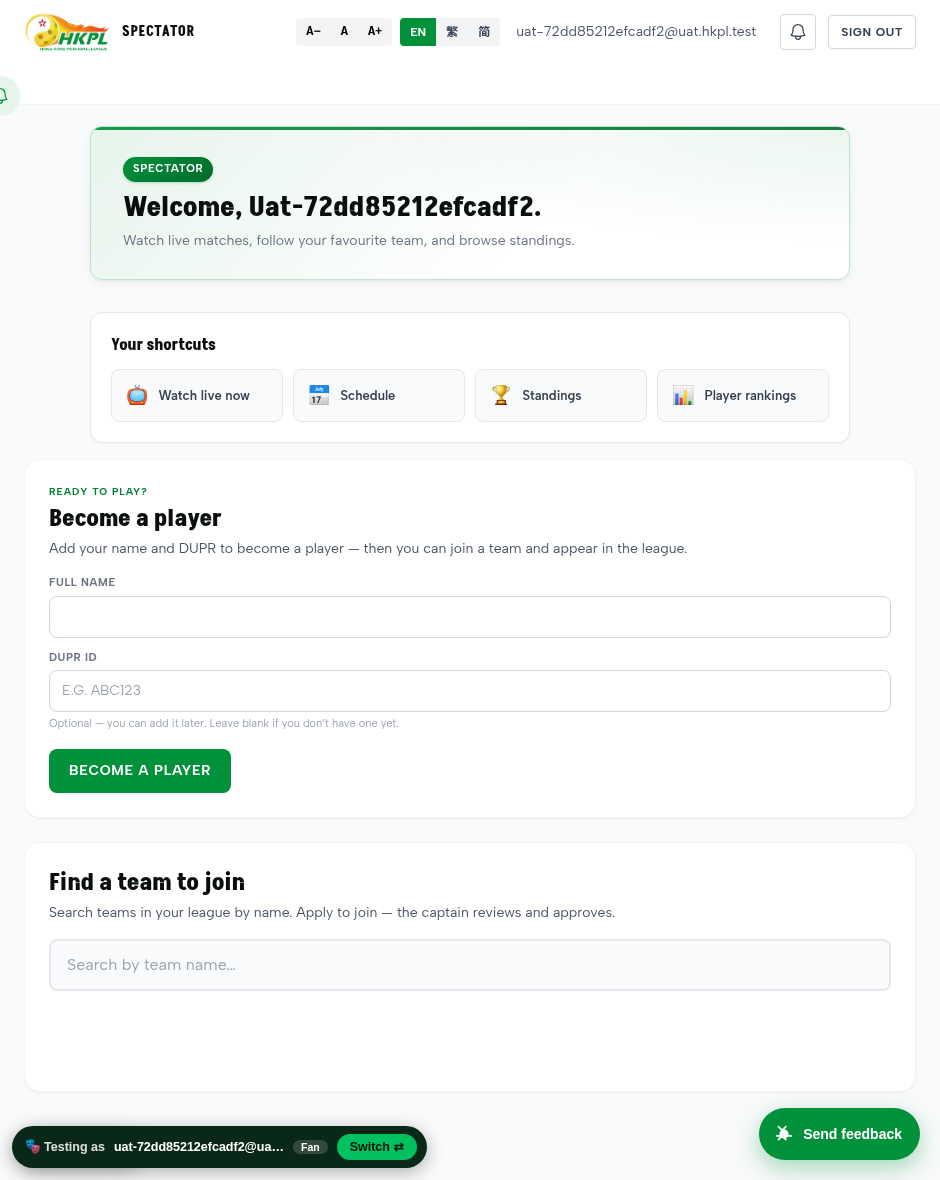
1 · Become a player
A brand-new person adds their name + DUPR and becomes a player, then applies to a team. No club or captain needed to start.
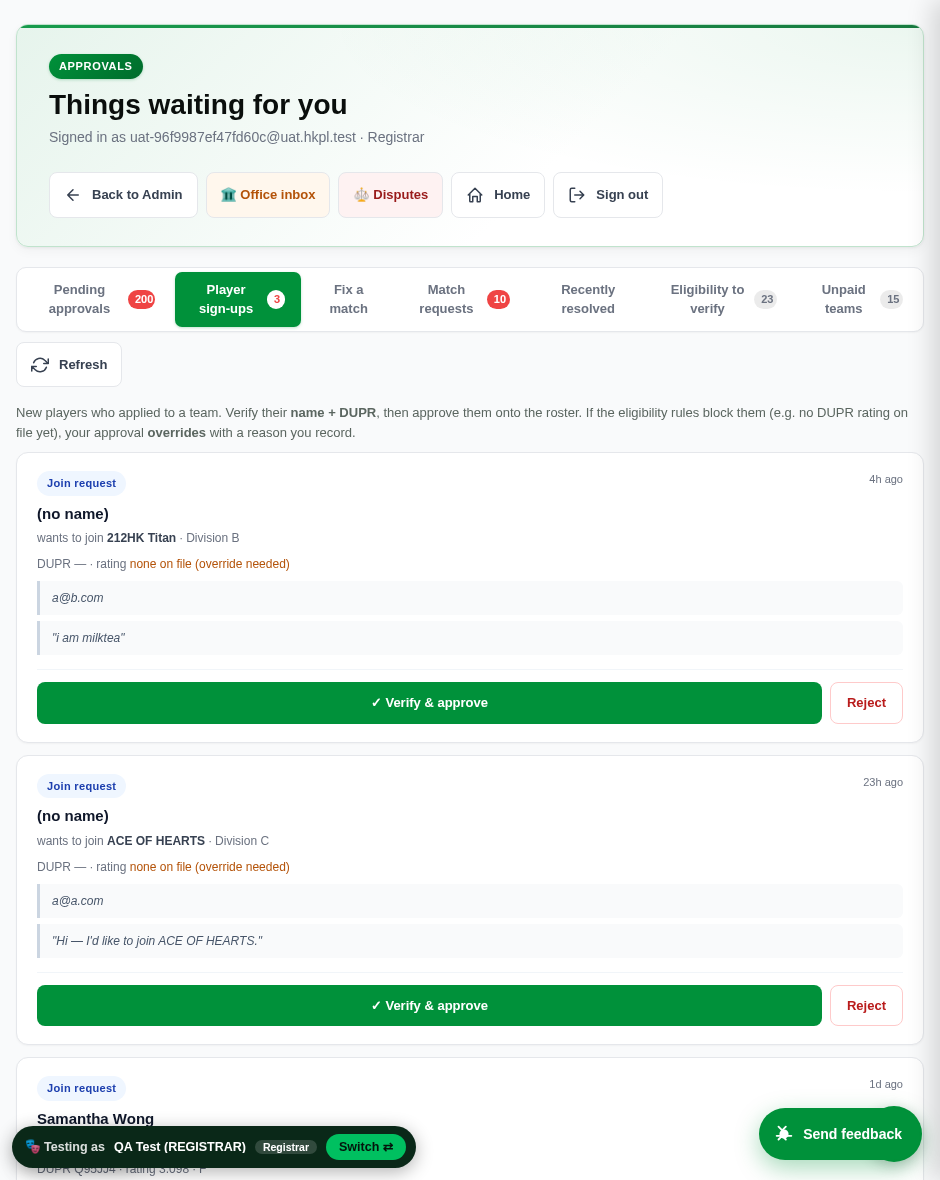
2 · Player sign-ups (Registrar)
The registrar sees every new player waiting for a team and can verify & approve — overriding the eligibility block with a logged reason.
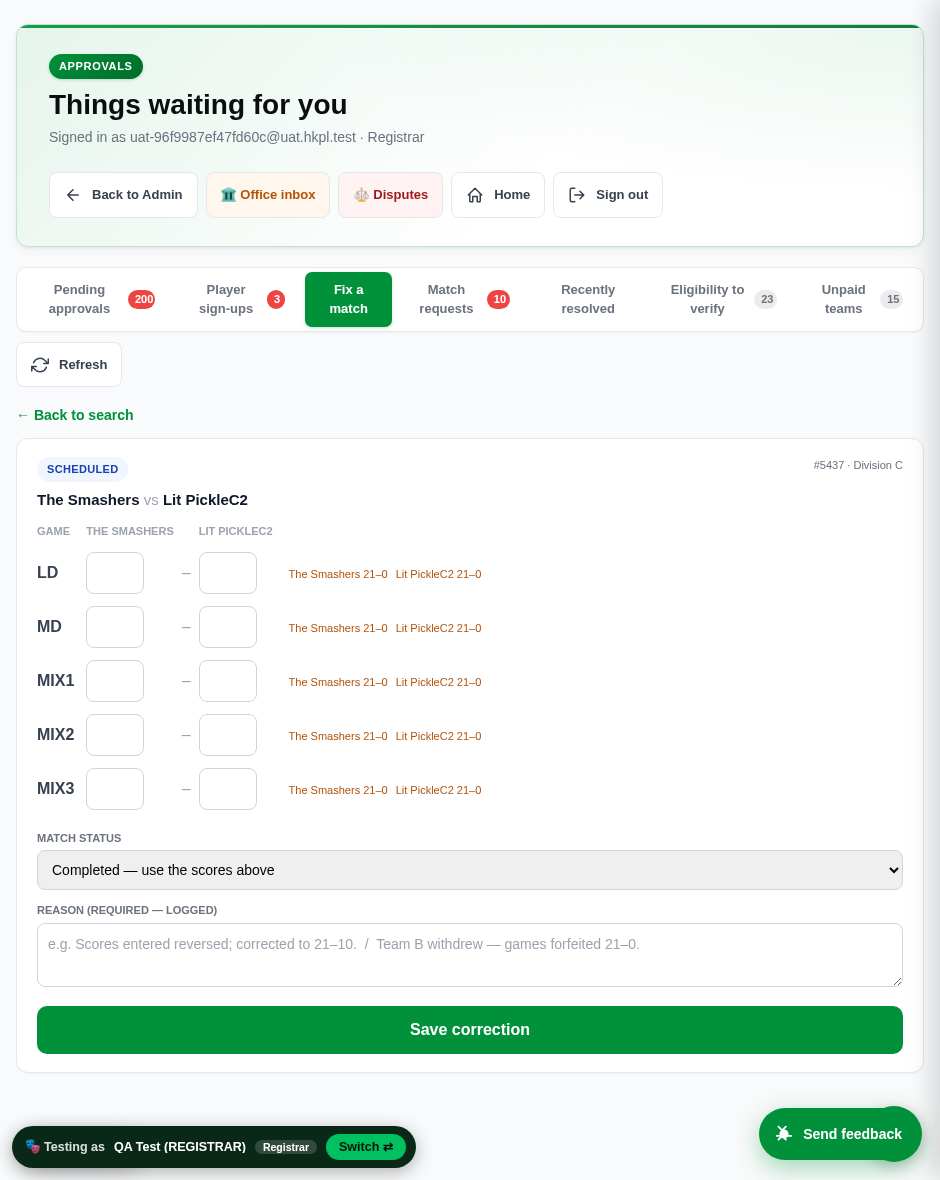
3 · Fix a match (Registrar)
Correct any game's score, forfeit a game 21–0, or cancel a match — with a required reason. DUPR stays in sync automatically.
4 · “Exit / new user” button (new tonight). A green 🎭 Testing as … · 🚪 Exit / new user pill now sits at the bottom-left of every screen. One tap signs you out of the current test identity and drops you back at the sign-in home — so you can register the next fake user in seconds. (You asked for this: “add a sign-out button… to quickly create a new user.”)
② The bugs you reported — fixed & re-verified all done
Grouped by topic. “You said” quotes your own video / WeChat words so you can match each item to what you sent.
The blocker — “if we cannot fix the player registration today, we cannot try the test run in the group.” Fixed end-to-end.
| What you reported | What was wrong → what it does now | Status |
|---|---|---|
| New player “created but not displayed” in the registrar queue (Video 2) | The registrar could never see new players. Now the “Player sign-ups” tab lists every one. | Fixed ✓ |
| Registrar can't find the player — “no Milk Tse on the registrar page” (Video 2) | Same root cause. Registrar now sees them and can Verify & approve with a reason. | Fixed ✓ |
| Becoming a player “can't be reached by the website” (Video 1) | No front door for a spectator. New “Become a player” captures name + DUPR. | Fixed ✓ |
Re-verified on your exact video team (CCC C team — genuinely over the 20-player cap): a new unrated player applied → the registrar saw them → override-approved onto the full team (roster 21 → 22), logged with a reason, then restored to 21. 6 / 6 checks passed.
| What you asked for | What it does now | Status |
|---|---|---|
| Withdrawal → count the game 21–0, keep the rest | One tap on “{team} 21–0” forfeits that game; other scores stay | Fixed ✓ |
| Fix a reversed / wrong score | Edit the game's two numbers → Save; standings recompute | Fixed ✓ |
| DUPR re-sync on a correction | A corrected match already on DUPR retracts the old result and re-sends the corrected one | Fixed ✓ |
| Self-serve — not the developer | A registrar screen (“Fix a match”); every change is logged | Fixed ✓ |
| What you reported | What was wrong → what it does now | Status |
|---|---|---|
| A registered club doesn't appear in the pending queue · “can only see 200 max, can't sort by latest” | The queue showed oldest first, capped at 200 — so anything new fell off the end. Now newest-first and the cap is raised, so a club/team/player you just created is at the top. | Fixed ✓ |
| Create many fake players from a fake email — “without 96 emails” | On the sandbox, any email signs in directly (no real email / magic link). We also removed a hidden per-computer limit that would have blocked a tester after ~20 sign-ups. | Fixed ✓ |
| Quick way out of a fake role to make the next user | The new “🚪 Exit / new user” pill signs out and returns to the sign-in home in one tap. | Fixed ✓ |
| “ROSTER 4, but MALE (0) & FEMALE (0)” — added players don't show on the team page | The roster only listed Male & Female groups, so a player with no gender set (which new fake players don't have) was counted but shown under neither. Now they appear under a “Gender not set” group — every rostered player is visible. | Fixed ✓ |
| Found during our own testing | Fix | Status |
|---|---|---|
| Cancelling a match kept the old scores instead of clearing them | A cancelled match now clears its games (caught by clicking Cancel and checking the database) | Fixed ✓ |
Two hand-typed sign-in links (admin, referee) gave a “not found” error | Both fixed; every sign-in link works. (The buttons on the sign-in page were never affected.) | Fixed ✓ |
③ Not a bug — it's already there, here's how how-to
A couple of things you flagged were the system working as intended — you just needed the path.
“Not approved — 20 players max · no DUPR rating” is deliberate, not a fault
When a captain tries to add an unrated player onto a full team, the system correctly stops them. The message even says “a registrar can override.” Here's how:
- Sign in as Registrar → open the “Player sign-ups” tab.
- Find the player — anyone with “none on file (override needed)” is unrated and waiting.
- Press ✓ Verify & approve, type a reason → they're on the roster, cap or rating notwithstanding.
How a brand-new player joins
- Sign in (Spectator) → tap “Become a player”.
- Enter name + DUPR (DUPR optional — add later).
- Use “Find a team to join”, search, press Apply.
- The captain approves — or the registrar overrides (above).
How to correct or cancel a match
- Sign in as Registrar → “Fix a match” tab.
- Search by team name or number → tap the match.
- Edit scores, tap “21–0” to forfeit a game, or set Forfeit / Cancel.
- Type the reason (required) → Save correction.
④ Tonight's group test — the run-sheet works verified 7 / 7
Richard's plan (each tester builds a club with 12 teams and 48 players, from zero). We ran the whole sequence end-to-end tonight — it works. Here it is, with one thing worth knowing up front.
Good news that saves you a lot of clicking: when a tester registers a club and you approve it, that tester becomes the club's manager; when they create teams and you approve them, that tester becomes the captain of each team. So each tester approves their own 48 players — you only need to approve the clubs and the teams, not the hundreds of player joins.
- Tester registers a user — Register with any fake email (e.g.
JANE-CLUB-A@test.com). On the sandbox they're signed in immediately — no email to wait for. - Register a club — signed in, Register → Club (e.g. JANE-CLUB-A). → It appears in your pending queue at the top.
- You (Richard) approve the club — the tester is now its Club Manager.
- Manager creates the 12 teams (A1–A4, B1–B4, C1–C4). Each goes to your queue; you approve them → the tester becomes captain of each.
- Create the player logins —
JANE-P1…P48@test.com, same one-tap fake-email sign-in. - Players search & join teams (4 per team). The club manager (the tester) approves their own players — or you can, from Player sign-ups.
Verified tonight, 7/7: fake-email register → club register → approve (tester = manager) → create teams → approve (tester = captain) → players join → approve → all rostered. Every test row was deleted afterwards, so the sandbox is clean for your testers.
⑤ Still open — your decision needs you
This changes how everyone gets into the sandbox, so we didn't want to change it without your say-so. Today it uses one fixed password in the sign-in links. Pick one:
A — Automatic weekly password
Rotates itself each week; the sign-in page always shows this week's link, so testers bookmark one page — nobody needs a new link sent. Last week's stops working (with a short grace so no one is locked out mid-session).
B — You set it yourself
A box on the admin screen to type a new sandbox password whenever you like. Full control; someone has to remember to change & re-share it.
C — Leave as-is until launch
Keep the single fixed password through UAT and revisit at go-live.
Reply A, B, or C and we'll switch it on.
Also logged for next round: the Facebook link on the site (you said “next round — not important now”). And two voice notes we couldn't pin exactly — a missing “pick a team” button and an “identify / MT join” step: a quick screenshot of that exact screen and we'll fix them straight away.
How we checked (so you can trust every “fixed” mark)
- 21 / 21 — a full run driving the real screens with real clicks: become a player → apply → registrar override-approves → match score-correct, forfeit, cancel. Confirmed in the database, not just “the page opened.”
- 7 / 7 — tonight's whole run-sheet (fake user → club → 12-team pattern → players join → approvals), each step checked in the database.
- 6 / 6 — the registration flow on your exact video team (CCC C team, over the 20-cap), then restored to 21.
- 27 / 27 — every role signs in and its page loads with no errors; the Send feedback button works; screens render on a phone.
- Every test we ran was cleaned up afterwards — the sandbox is untouched for your testers.
Sign in & test tonight
One link, one click into any role — no password to type:
→ https://uat.silkvo.com/qa.html
To build a club (run-sheet): Register with a fake email → sign in → Register a Club → (Richard approves) → create teams → make players (fake emails) → they join teams.
Player registration: Spectator → “Become a player”. Approve as Registrar → “Player sign-ups.”
Match correction: Registrar → “Fix a match.”
Switch fake user quickly: the 🚪 Exit / new user pill, bottom-left.
Report anything with the green Send feedback button (bottom-right of every screen) — a Cantonese voice note is perfect.